Business email
Email that matches your business: [email protected]
Look professional with an address on your own domain. Read and send from your browser or any mail app, and set it up with step-by-step DNS checks.
What you do not need
- A separate email provider or another bill
- To know what MX, SPF or DKIM mean: we show you the records and check them
- A developer to set it up
- To change anything on your website
How it works
- 1
Connect your domain
Email works on a domain you have connected to ShopFront. If you have not done that yet, the custom domain page shows how.
- 2
Add your DNS records
Turn on email for the domain and we show the records to add. If the domain already has email, we show what is there and ask before changing anything.
- 3
Create your mailboxes
Create addresses like info@ or orders@, set a password for each, and start sending. Open webmail in your browser or add the account to any mail app.
See it inside ShopFront
Real product screens. Open any screenshot at full size to explore the details.
Your domain's email, in one panel
View mailboxes, available capacity and email DNS checks, with tabs for mail-app connection settings and DNS records. The capture shows one configured mailbox; limits depend on your plan.
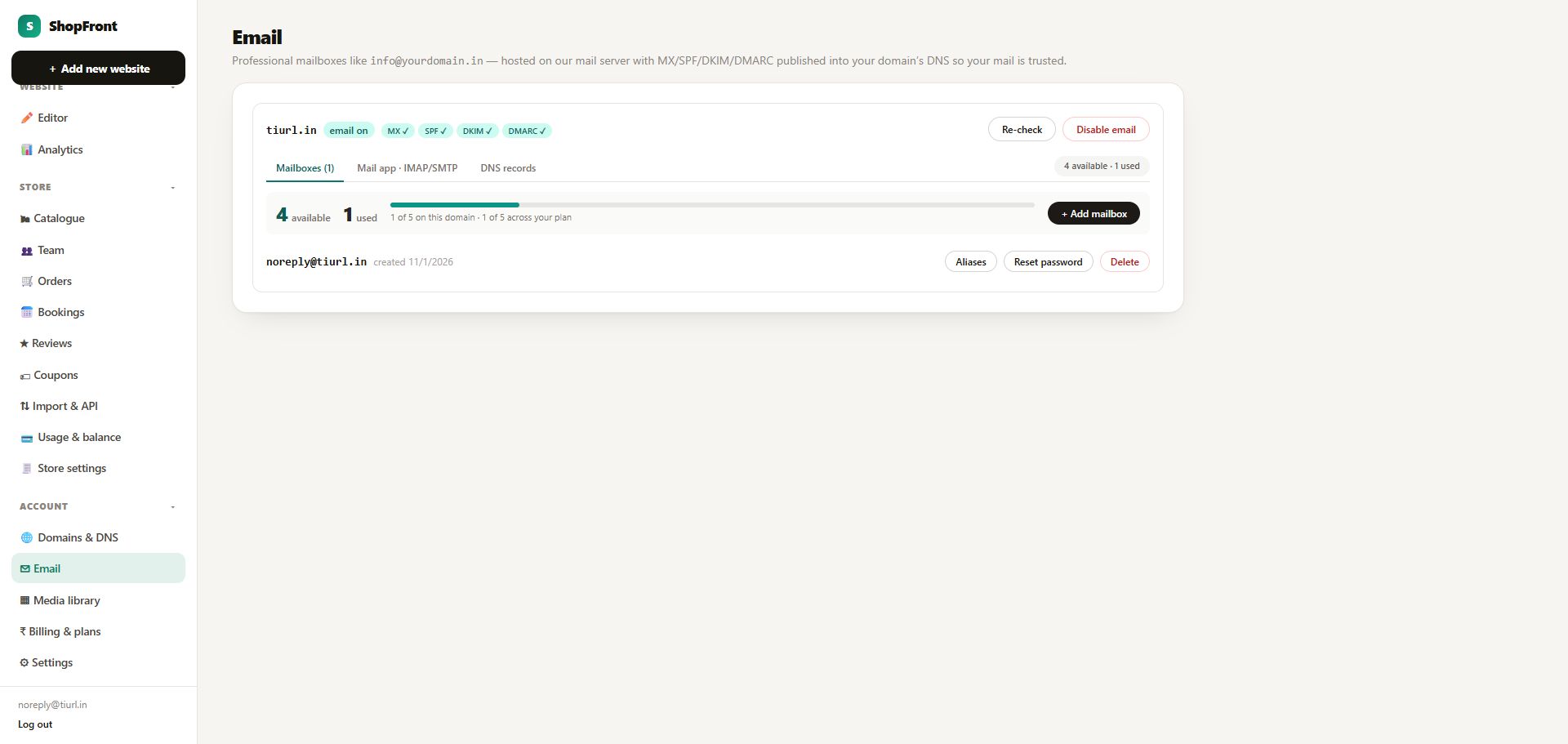 Open full-size screenshot (new tab) ↗
What you get

5 mailboxes of 2 GB each
Each address has its own password and its own 2 GB of storage.

Webmail in your browser
Read, reply and search from any computer or phone without installing anything.

Works in any mail app
Use the standard IMAP and SMTP settings we show you in Gmail, Outlook, Apple Mail or any other mail app.

Guided DNS with live checks
We show the MX, SPF, DKIM and DMARC records, then check them and mark each one done, so you can see when mail is ready.

Signed and authenticated
Your messages are signed, and your domain publishes the SPF and DMARC records that Gmail and others look for.

Safe with existing email
If your domain already receives email, we detect it and ask you to confirm before replacing anything.
Reset a password in one click
Forgotten password? Reset it from your dashboard, no support ticket needed.
Free email or your own domain
| A free Gmail or Yahoo address | Email on your domain with ShopFront | |
|---|---|---|
| Address | [email protected] | [email protected] |
| Looks professional | Less | Yes |
| Matches your website | No | Yes |
| Cost | Free | Included in the 5 Pages + Email plan (₹99/month) |
What it costs
Business email is included in the plan below, together with your website and custom domain. Prices are in rupees and include GST. You can cancel any time from your dashboard; your site stays live until the end of the period you paid for.
5 Pages + Email
₹99/month
5 pages, your own domain with HTTPS, 5 business email addresses, no ShopFront badge. Or ₹999 a year.
5 Pages + Email + Store
₹298/month
5 pages, your own domain with HTTPS, 5 business email addresses, no ShopFront badge. Or ₹2,989 a year.
Questions, answered
How many mailboxes do I get?
Up to 5 mailboxes on the 5 Pages + Email plan, each with 2 GB of storage.
Do I need a website with ShopFront to use the email?
You need your own domain connected to ShopFront. The same plan includes your website and the domain connection.
Can I use it on my phone?
Yes. Open webmail in your phone's browser, or add the account to any mail app using the IMAP and SMTP settings we show you.
Will my emails reach the inbox?
We sign your messages and publish the SPF and DMARC records receivers look for. No email provider can promise inbox placement, and a new domain with little history can land in spam at first. Start with a few real conversations and ask people to mark your mail as not spam.
My domain already has email. What happens?
We detect existing email on the domain and show you what is there. We change nothing until you confirm.
Can I use my own Gmail or Outlook instead?
You can keep using them. Email on your domain with ShopFront is an option, not a requirement.
What if I cancel?
You can cancel any time. Your mailboxes and domain connection stay until the end of the period you paid for, then they are switched off.