Answer the basics before the click
Show the service area, opening hours and relevant product or service details on the page. Visitors should be able to check whether your business fits their needs before opening a conversation.
Business website with WhatsApp contact
A WhatsApp contact link gives visitors a familiar way to ask a question after reading about your business. Pair the link with useful product or service information so the conversation starts with context.
Build and edit free. An active eligible plan is required to publish.

Make the page useful
Show the service area, opening hours and relevant product or service details on the page. Visitors should be able to check whether your business fits their needs before opening a conversation.
Add the intended WhatsApp number and test the link on a phone. Make the button label describe the action, such as asking about a service, rather than implying an order or booking has already been placed.
Publish your contact hours and explain what information will help your team respond. A website contact link does not provide an automated reply, chatbot or guaranteed response time.
Before you build

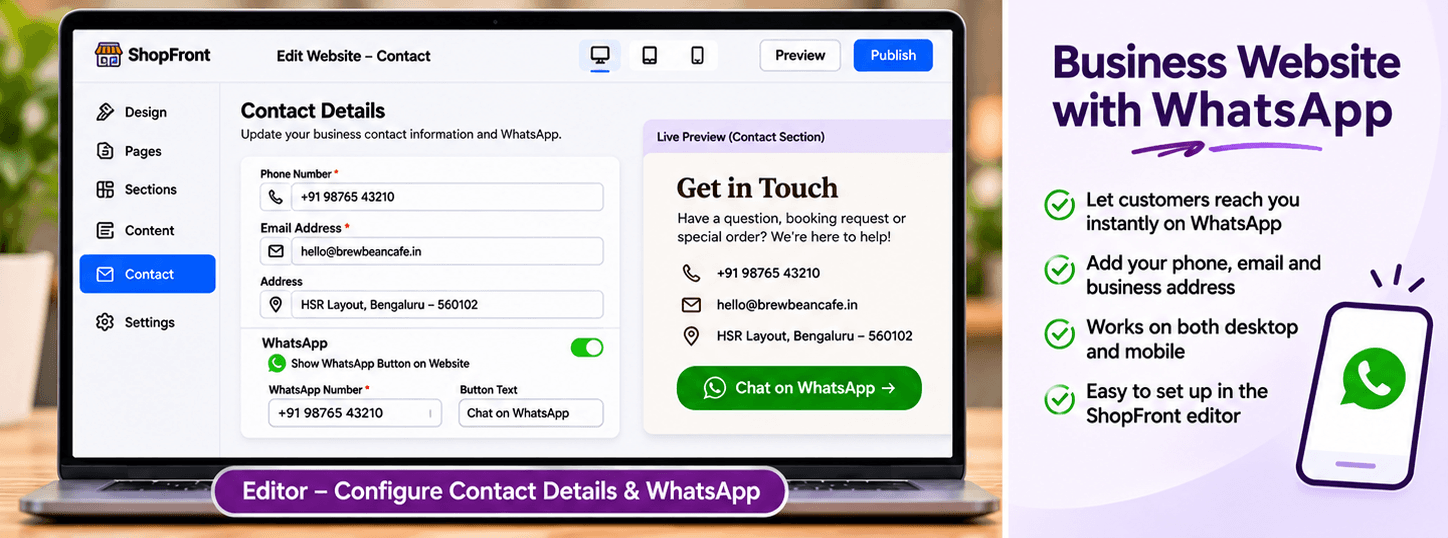
Choose a template, add your business content and preview the result. Keep later edits in a draft until you are ready to publish them.
Start with the page allowance you need. Review current plans for publishing, custom-domain and email entitlements before choosing your setup.
Compare current plansNo. This is a contact link to WhatsApp. Automated replies, campaigns or a chatbot are separate capabilities and are not implied by adding the button.
Yes. Include your phone, email or address alongside WhatsApp where appropriate, so visitors can choose the contact method that works for them.
Create an electrician website with service areas, work examples, availability and call or WhatsApp enquiry links using ShopFront.
Create a salon website with services, prices, team information, photos and appointment enquiry links using ShopFront.
Plan and build a small business website in India with ShopFront. Bring together services, photos, contact details and your own domain.
Explore the editor, prepare your content and choose a plan when you are ready to publish.
Start building free